Active Directory Synchronization
FaxCore Evolution eV6 provides a one-way, read-only synchronization engine with Microsoft Active Directory (LDAP). FaxCore reads user objects, email addresses, and telephone/DID attributes from AD and creates or updates corresponding accounts in FaxCore.
Note
Directory Synchronization is configured per-domain. Native FaxCore accounts can co-exist alongside synchronized AD accounts without interference.
Connection Configuration
Navigate to Domain Settings > Directory Sync.
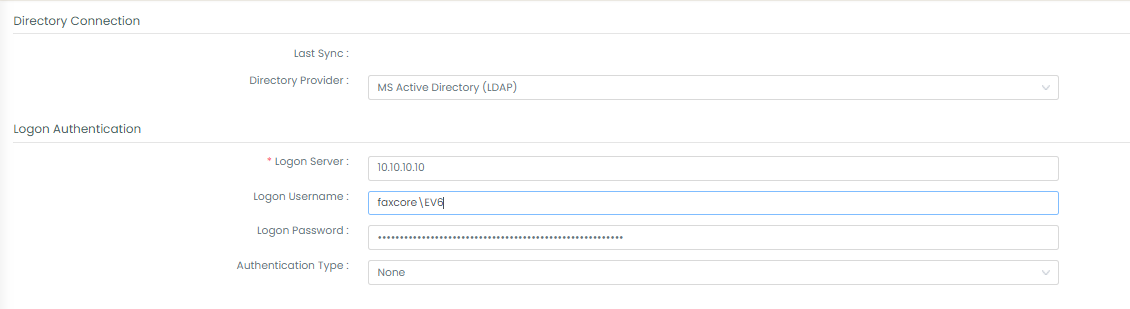
- Directory Provider: MS Active Directory (LDAP).
- Logon Server: IP address or FQDN of the domain controller.
- Logon Username / Password: Credentials for a service account with read permissions in Active Directory.
Search Filter Settings
To control exactly which organizational units or security groups are synchronized, define search filters:
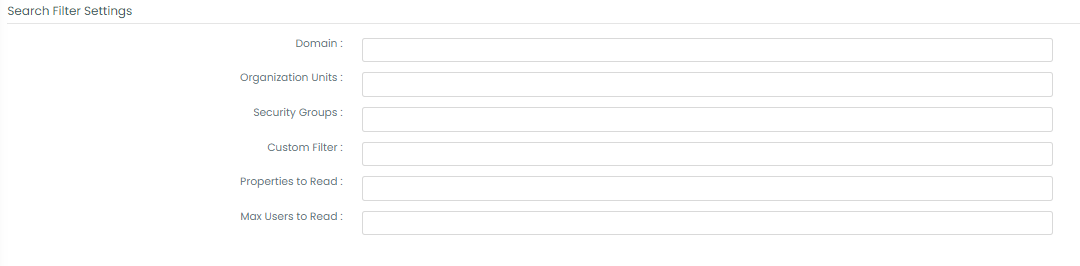
1. Domain
The fully qualified Active Directory domain name:
local.faxcore.com
2. Organizational Units (OU)
Limit synchronization to specific OUs using simple names or LDAP paths (separated by semicolons):
- Single OU:
FaxCore - Sub-OU:
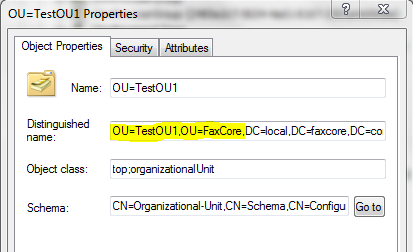
TestOU1,OU=FaxCore - Multiple OUs:
TestOU1,OU=FaxCore;OU=Accounting
Tip
Use Microsoft's Active Directory Explorer (ADExplorer.exe) to inspect the object's distinguishedName attribute. FaxCore automatically provides the root OU=, so enter: TestOU1,OU=FaxCore.
3. Security Groups
Synchronize only members of a specific security group:
CN=Domain Admins,CN=Users,DC=local,DC=faxcore,DC=com
4. Custom Filters
Standard LDAP query filter expressions:
- Member of group:
memberof=CN=Domain Admins,CN=Users,DC=local,DC=faxcore,DC=com - Specific user only:
CN=Administrator
Processing Rules & Sync Schedules

- Synchronize Mode:
- Add Only: Creates newly discovered accounts but never updates existing accounts.
- Update Only: Refreshes existing accounts without adding new users.
- Add and Update: Recommended full reconciliation.
- Enable Auto Sync: Set to Yes to establish recurring synchronization (Daily, Weekly, Monthly) with scheduled execution times.
User & Inbound Route Mapping
User Identification & Authentication
- Username Format: Choose Short Username (e.g.,
jdoe) or Full UPN (e.g.,jdoe@faxcore.com). - Authentication Mode: Set to External so users authenticate via AD Kerberos/NTLM credentials.
Automated Inbound DID Routing from AD
FaxCore can automatically build inbound routing rules based on the user's AD phone attributes:
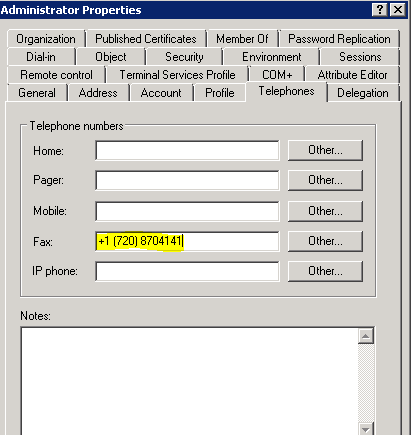
- Default Attribute: Reads the standard
facsimiletelephonenumberattribute. - Custom Attribute: Can be set to
mobile,telephoneNumber, or custom schema attributes. - Prefix / Digit Truncation:
- If the AD phone number is
+1 (303) 8704141 - Set Prefix to append to
*and Max Length to4 - FaxCore automatically provisions an inbound route matching
*4141directed to the user.
- If the AD phone number is
Deleted User Handling
Defines actions when a previously synchronized user is deleted or removed from the AD search scope:
- Ignore FaxCore User: Leave the account active.
- Set FaxCore User Inactive: Disables login while preserving all fax history and audit logs.
- Delete FaxCore User: Permanently removes the account from the domain.