Blacklist Publications & Subscriptions
FaxCore allows administrators to prevent transmission to restricted numbers (e.g., premium toll lines, 900/976 numbers, emergency services, or customer opt-outs) through Blacklist Publications.
1. Creating a Blacklist Publication
- In the Admin Panel, navigate to Global Settings > Blacklist Publication.
- Click New:
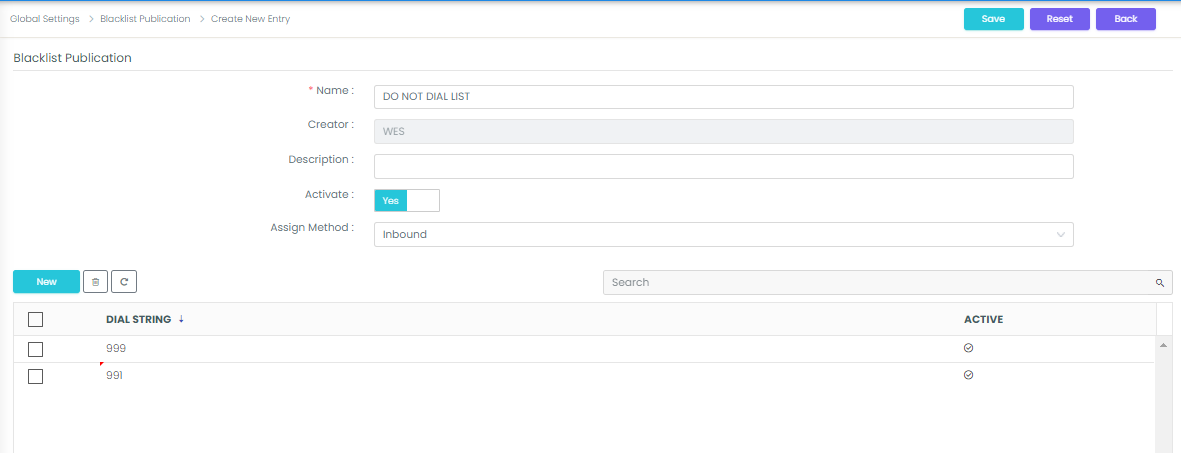
- Enter a descriptive Name (e.g.,
Do Not Dial ListorEmergency Block). - In the Dial String field, input forbidden number prefixes (e.g.,
911,900,999). - Click New after each prefix to add it to the list.
- Click Save & Close.
Important
Prefix Comparison Logic
Wildcards (*) are not used in blacklist definitions. FaxCore performs left-to-right prefix matching:
- Blacklisted String:
999 - User Enters:
9991114444 - Match Result: BLOCKED
2. Subscribing Users and Domains
After creating a publication, enforce it by subscribing domains or individual users:
- Navigate to Domain Settings > Blacklist Subscription.
- Click the Subscribe icon next to the target publication:
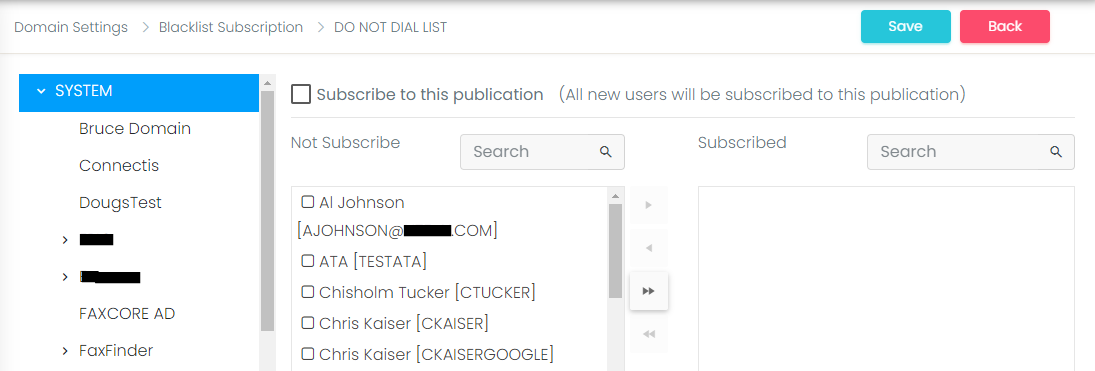
- In the left panel, select entire domains to enforce the blacklist globally across all domain accounts.
- Alternatively, use the right panel to selectively subscribe individual users.
- Click Save and Close. Any attempt by subscribed accounts to dial blocked numbers will be immediately rejected with an audit failure notification.