SQL Database Backup & Disaster Recovery
FaxCore stores all transactional records, user definitions, domain hierarchies, and routing rules in a Microsoft SQL Server database (typically named fxc_V6). Maintaining verified backups is essential for disaster recovery and business continuity.
Backup Methods
Method 1: SQL Server Management Studio (SSMS)
- Open SSMS on the database host and connect to the SQL Server instance.
- Expand Databases, right-click
fxc_V6, and select Tasks > Back Up:
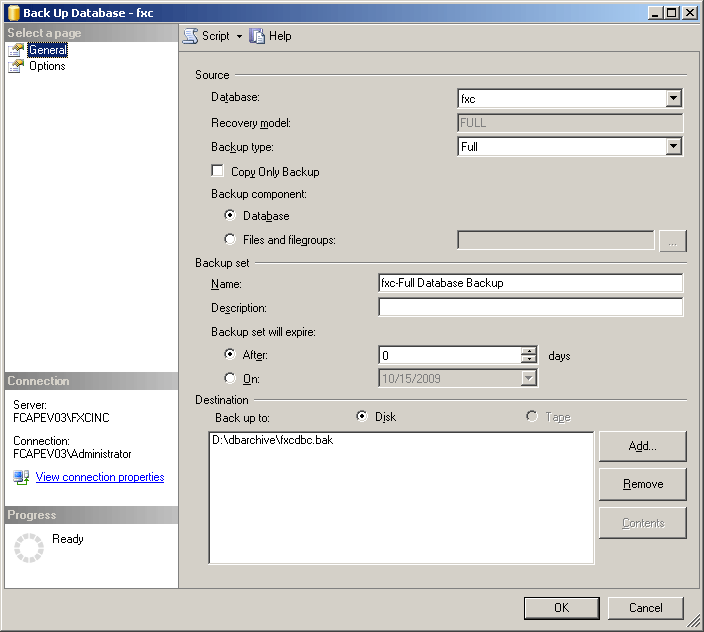
- Set Backup type to Full.
- In the Destination section, specify the target file path (e.g.,
D:\FXCDBBAK\fxc_V6.bak). - In the Options page, select Verify backup when finished.
- Click OK to execute the backup.
Method 2: Automated SQL Server Agent Jobs (Enterprise Edition)
For SQL Server Standard/Enterprise installations:
- In SSMS Object Explorer, expand SQL Server Agent.
- Right-click Jobs > New Job.
- Under Steps, add a T-SQL step executing:
BACKUP DATABASE [fxc_V6] TO DISK = N'D:\FXCDBBAK\fxc_V6_Daily.bak' WITH INIT, STATS = 10; - Under Schedules, establish a daily recurring schedule.
Method 3: Command-Line Automation via SQLCMD / OSQL
Use Windows Task Scheduler to run a batch script:
sqlcmd -S localhost -U fxc_admin -P "YourPassword" -Q "BACKUP DATABASE [fxc_V6] TO DISK='C:\FXCDBBAK\fxc.bak' WITH FORMAT, MEDIANAME='FaxCore_Backup'"
Database Disaster Recovery & Restore Procedure
1. Restore Database from Backup
- In SSMS, right-click Databases and select Restore Database:
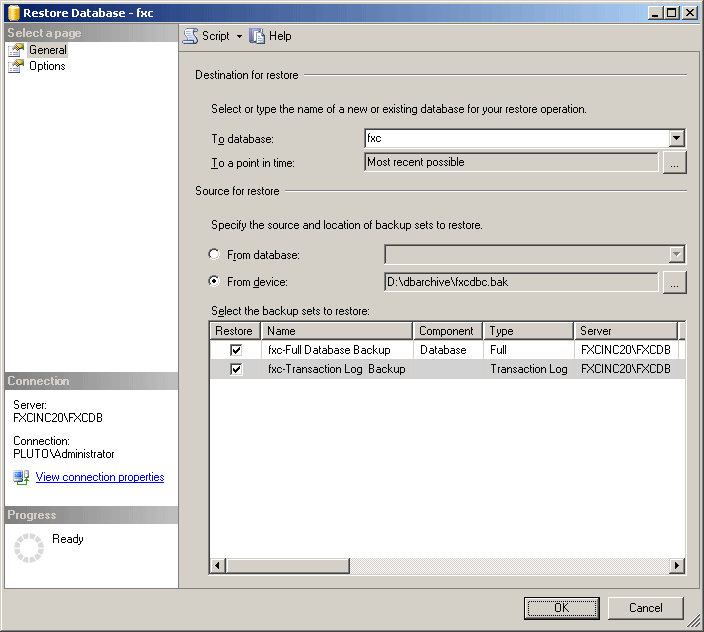
- Select From device, browse to the
.bakarchive file, and check the target backup set. - On the Options page, verify data file (
.mdf) and log file (.ldf) paths. - Click OK to complete the database restoration.
2. Orphaned User Re-Mapping (fxc_admin)
When restoring a database to a new SQL instance, the database user fxc_admin becomes orphaned from the SQL Server server-level login. Follow these steps to re-link credentials:
- Expand the restored
fxc_V6database > Security > Users. - Delete the existing orphaned user:
fxc_admin. - In SSMS Object Explorer, expand instance Security > Logins.
- Right-click Logins > New Login:
- Login Name:
fxc_admin - Authentication: SQL Server Authentication (enter authorized FaxCore database password).
- Default Database:
fxc_V6.
- Login Name:
- On the User Mapping page:
- Check the box for database
fxc_V6. - Under Database role membership, check
db_ownerandpublic.
- Check the box for database
- Click OK.
- Restart the FaxCore core services to resume normal operations.