Dialing Rules & String Manipulation
Dialing rules normalize recipient numbers, apply PBX access codes (e.g., dial 9 for outside line), insert long-distance carrier codes, and strip redundant area codes for local dialing.
Note
Standard Dialing Rules apply to standard Fax address types. Raw Fax addresses bypass these rules unless Raw Fax Dialing is explicitly activated.
Configuring Global Dialing Rules
Navigate to Network Settings > Fax Agent > Dialing Rules.
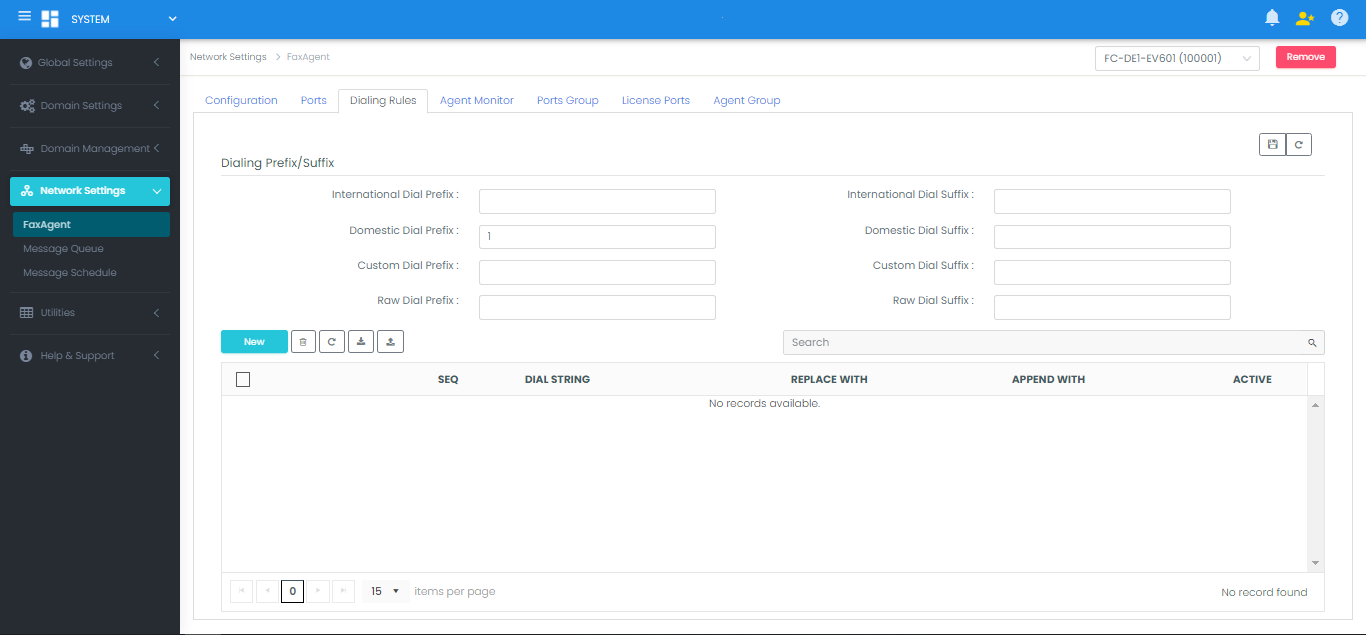
Rule Fields
- International Dial Prefix/Suffix: Prepended/appended when FaxCore detects a recipient Country Code differing from the local Country Code configured on the FaxAgent.
- Domestic Dial Prefix/Suffix: Prepended/appended when the recipient has the same Country Code but a different Area Code (long distance).
- Raw Dial Prefix/Suffix: Applied only to Raw Fax address formats.
Dialing Scenarios & Examples
Example 1: International Destination
- Local Country Code:
1(North America) - International Dial Prefix:
011 - Recipient Input:
+60 3 33249226(Malaysia) - Resulting Dial String:
01160333249226 - Explanation: FaxCore detects a country code mismatch (
60≠1) and prepends the international exit code011.
Example 2: Local Call (Same Area Code)
- Local Area Code:
303(Denver, CO) - Domestic Dial Prefix:
1 - Recipient Input:
+1 303 8774141 - Resulting Dial String:
8774141 - Explanation: FaxCore matches both Country Code (
1) and Area Code (303). It strips the country and area codes for local 7-digit dialing.
Example 3: Domestic Long Distance
- Local Area Code:
720 - Domestic Dial Prefix:
1 - Recipient Input:
+1 732 5550015(New Jersey) - Resulting Dial String:
17325550015 - Explanation: Area codes differ (
732≠720), so the domestic prefix1is prepended.
Custom Dialing Rules
Custom dialing rules execute search-and-replace or string-append operations to accommodate custom PBX routes, extensions, or VoIP gateways.

Custom Replacement Rule
- Target Match:
1303 - Replace With:
303 - Original Number:
13038704141 - Final Dialed String:
3038704141
Custom Extension Append Rule
- Target Match:
1303 - Append With:
,,,,5555(four 1-second pauses followed by internal extension) - Original Number:
13038704141 - Final Dialed String:
13038704141,,,,5555
Warning
FoIP (XCAPI, SR140 & etherFAX) Compatibility
On software FoIP architectures (TE-SYSTEMS XCAPI, Enghouse Brooktrout SR140, etherFAX), never insert , (comma pauses) or w (wait for dial tone) into dialing rules. These analog DTMF signals are not supported over SIP/T.38 sessions.
Raw Fax Dialing Rules
Raw Fax addresses allow backend systems to pass pre-formatted telephone strings directly to the telephony port or FoIP channel. Raw Fax rules are configured at the Domain level:
- Navigate to Domain Settings > Fax Settings.
- Scroll to the Dialing Rules section:
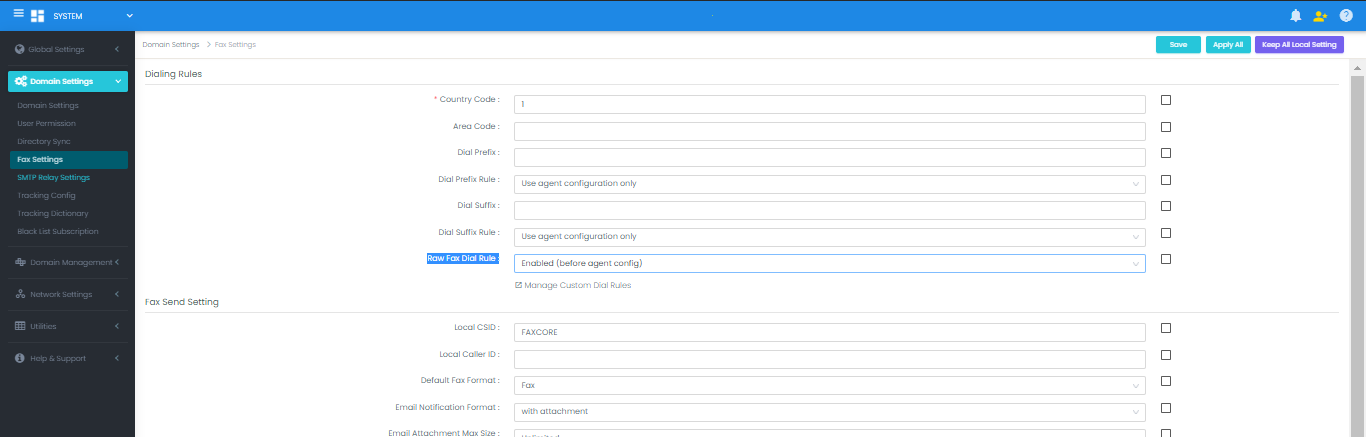
- Set Raw Fax Dial Rule to Enabled.
- Click Save and Apply All, then click Manage Custom Dial Rules.
- Add target strings and define Replace with or Append with values.
Tip
Domain Inheritance Child domains can automatically inherit the root domain's raw dialing rules by checking Inherit Domain Rules.