Document Store Architecture & Backup
While the SQL database retains transactional logs and audit records, all actual document content—incoming faxes, rendered outbound TIFFs, user attachments, and temporary spool files—is maintained in the FaxCore Document Store.
Document Store Locations
Navigate to Global Settings > Document Stores in the Admin Panel to view the active directory paths:
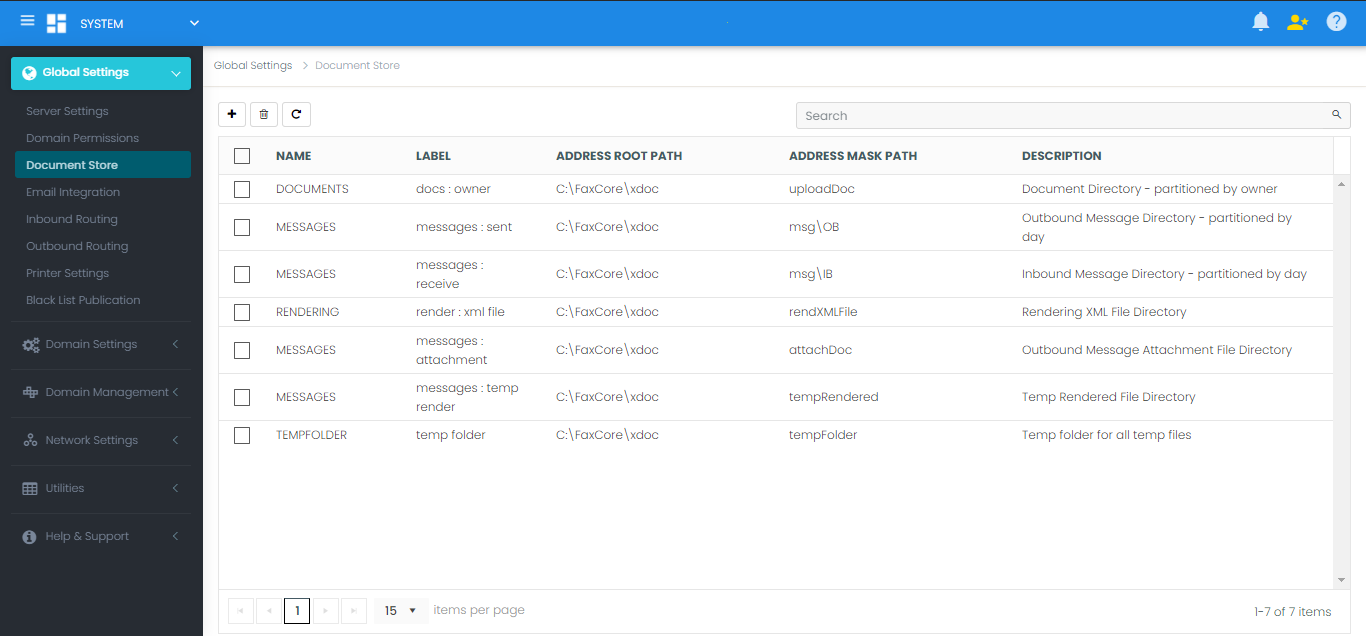
| Store Name | Default Directory Path | Description |
|---|---|---|
| DOCUMENTS | C:\FaxCore\xdoc\uploaddoc\ |
User document uploads and temporary attachments. |
| MESSAGES (Sent) | C:\FaxCore\xdoc\msg\OB\ |
Outbound rendered message directory partitioned by day. |
| MESSAGES (Receive) | C:\FaxCore\xdoc\msg\IB\ |
Inbound received faxes partitioned by day. |
| RENDERER | C:\FaxCore\xdoc\render\File\ |
Intermediate document conversion rendering cache. |
| TEMP FOLDER | C:\FaxCore\xdoc\tempfolder\ |
Temporary scratch workspace for processing tasks. |
Enterprise Backup Strategy
For comprehensive disaster recovery, both the SQL database and the Document Store folders must be backed up concurrently:
- Volume Shadow Copy (VSS): Utilize enterprise file backup agents (e.g., Veeam, Azure Backup, Commvault) supporting VSS snapshots of the
\xdoc\directory tree. - UNC / Storage Area Network: In multi-server enterprise environments, relocate Document Store paths to high-availability NAS/SAN shares (e.g.,
\\storage01\FaxCore_Docs\) with redundant RAID arrays and automated snapshot replication.