FaxCore Domains & Hierarchy
FaxCore Evolution eV6 features a hierarchical domain architecture modeled after Microsoft Active Directory forests. Administrators can create root and child domains to represent business units, branches, or separate client companies in multi-tenant environments.
Configuration Precedence & Inheritance
Configuration values and permissions flow downward through the hierarchy, but can be overridden at lower levels:
flowchart TD
    Server["Server / Global Level<br/>(Lowest Precedence - System Baseline)"]
    Domain["Domain Level<br/>(Middle Precedence - Inherited Policies)"]
    User["User Level<br/>(Highest Precedence - Direct Overrides)"]

    Server -->|"Inherits Default Policies"| Domain
    Domain -->|"Inherits & Can Override"| User

    style Server fill:#0B3348,stroke:#537DB5,stroke-width:2px,color:#FFFFFF
    style Domain fill:#537DB5,stroke:#0B3348,stroke-width:2px,color:#FFFFFF
    style User fill:#FF9326,stroke:#333333,stroke-width:2px,color:#FFFFFF
- User Level: Settings explicitly configured on an individual user profile take the highest precedence.
- Domain Level: Inherited by users unless overridden at the user level.
- Server / Global Level: Serves as the system-wide baseline.
Creating a Domain
By default, FaxCore contains a root SYSTEM domain. To establish child domains:
- Click the top-left domain navigation selector (labeled SYSTEM). The domain panel will open:
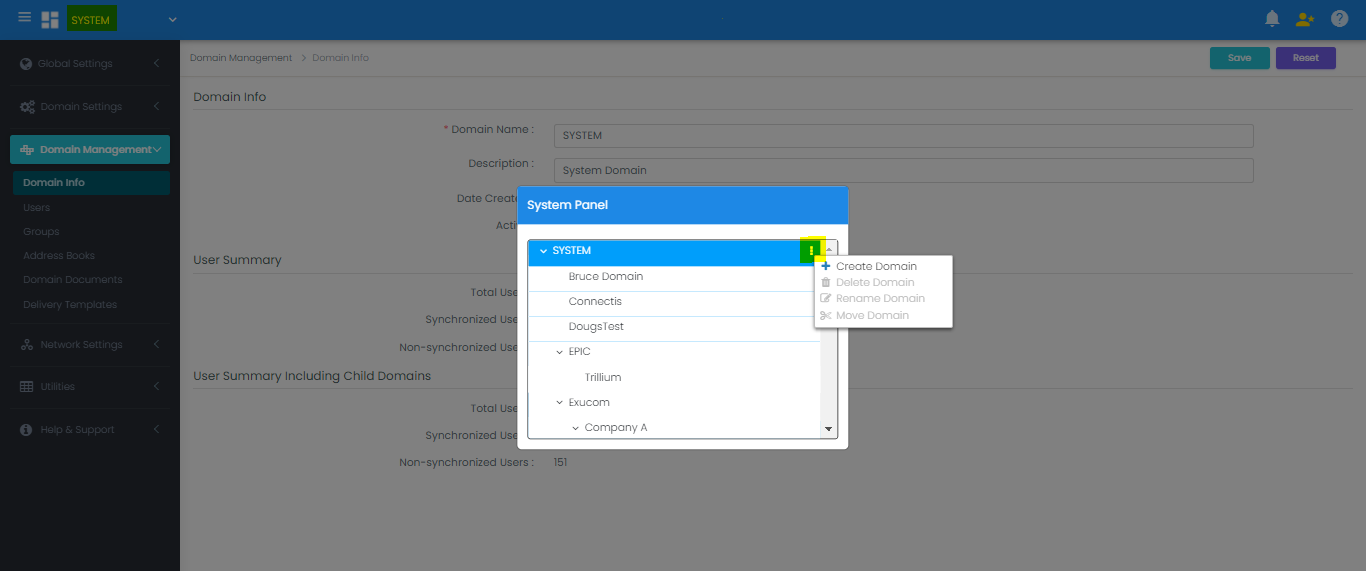
- Right-click the parent domain in the hierarchy tree and click Create Domain.
- Enter the domain name and save. The new child domain immediately inherits the parent's baseline policies.
Modifying, Moving & Deleting Domains
Navigate to Domain Management > Domain Info.
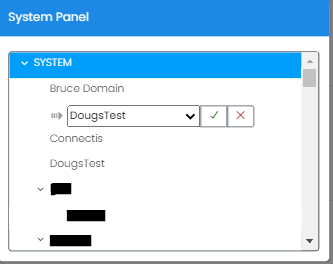
- Rename: Right-click the domain and select Rename.
- Move: Choose Move Domain to reposition a child domain under a different parent branch in the tree.
- Delete: A domain can be deleted only after all user accounts within it have been moved or removed.
Note
The root SYSTEM domain cannot be moved, renamed, or deleted.