FaxAgent Service Management
The FaxCore FaxAgent (FXC6.FaxAgent) service bridges the core FaxCore application with software Fax over IP (FoIP) middleware stacks (TE-SYSTEMS XCAPI, Enghouse Brooktrout SR140) and cloud hybrid networks (etherFAX).
Supported Telephony & FoIP Drivers
FaxCore FaxAgent interfaces with industry-standard pure software FoIP middleware drivers and cloud-native transports:
| Driver / Telephony Package | Developer / Vendor | Protocols & Transports | Description & Download |
|---|---|---|---|
| TE-SYSTEMS XCAPI | TE-SYSTEMS | SIP (T.38 & G.711 pass-through), H.323 | Enterprise software FoIP middleware connecting FaxCore to VoIP PBXs and SIP trunks (Cisco CUCM, Avaya Aura, Mitel, Innovaphone, AudioCodes, Teams SBCs) without physical boards. → Download: XCAPI FoIP Agent |
| Enghouse Brooktrout SR140 | Enghouse Interactive | SIP (T.38 & G.711 pass-through), H.323 | Enterprise software-only Fax over IP (FoIP) driver (Boston SDK / SR140) for virtualized environments and SIP network connectivity. → Download: Dialogic Brooktrout Driver |
| etherFAX | etherFAX LLC | HTTPS / TLS hybrid cloud | Cloud-native FoIP transport providing end-to-end encrypted fax delivery without local telco lines or SIP trunks. • Note: Built directly into FaxCore Evolution eV6 (no external driver installation required). |
Service Registration
Upon installation, FaxCore registers the primary local FaxAgent automatically. Manual registration or re-registration is required only when:
- Deploying a secondary or remote FaxAgent server in a distributed topology.
- Changing the host server name or IP address.
- Performing a major driver upgrade (e.g., Brooktrout SR140 Boston driver or XCAPI updates).
- Adding or modifying FoIP channel allocations and virtual line licenses.
Registration Procedure
- Open the FaxAgent configuration file located at:
C:\FaxCore\svc.faxagent\FaxAgent.exe.config - Locate the
<appSettings>section:<appSettings> <!-- Set to "localhost" if co-located with FaxCore, or specify FQDN / IP if remote --> <add key="Server" value="localhost" /> </appSettings> - Locate the
<applicationSettings>section and verify the Web Services URL:<applicationSettings> <FaxAgent.Properties.Settings> <setting name="FaxAgent_FXWS_wfFaxAgent" serializeAs="String"> <value>http://localhost:2372/WebServices/wfFaxAgent.asmx</value> </setting> </FaxAgent.Properties.Settings> </applicationSettings> - Save the file.
- In the Windows Services Management Console (
services.msc), ensure the FXC6.FaxAgent startup type is configured to Automatic and start the service.
Important
IP / Hostname Changes If the IP address or hostname of the FaxAgent server changes, the agent must be removed from Network Settings > Fax Agent in the Admin Panel and re-registered. Outbound routing rules referencing the old agent ID must also be updated.
Service Re-Registration
If channel allocations or virtual port configurations change, reset the agent registration:
- Navigate to Network Settings > Fax Agent > Configuration.
- Select the target agent from the dropdown and click Delete.
- Stop the FXC6.FaxAgent Windows service on that server.
- Edit
FaxAgent.exe.configand clear theAgentIDvalue:<add key="AgentID" value="" /> - Save the configuration and start the FXC6.FaxAgent service.
- The service contacts the core server, requests a fresh identifier, and populates the new channels into the agent pool automatically.
FaxAgent Regional Configuration
In the Admin Panel under Network Settings > Fax Agent > Configuration:
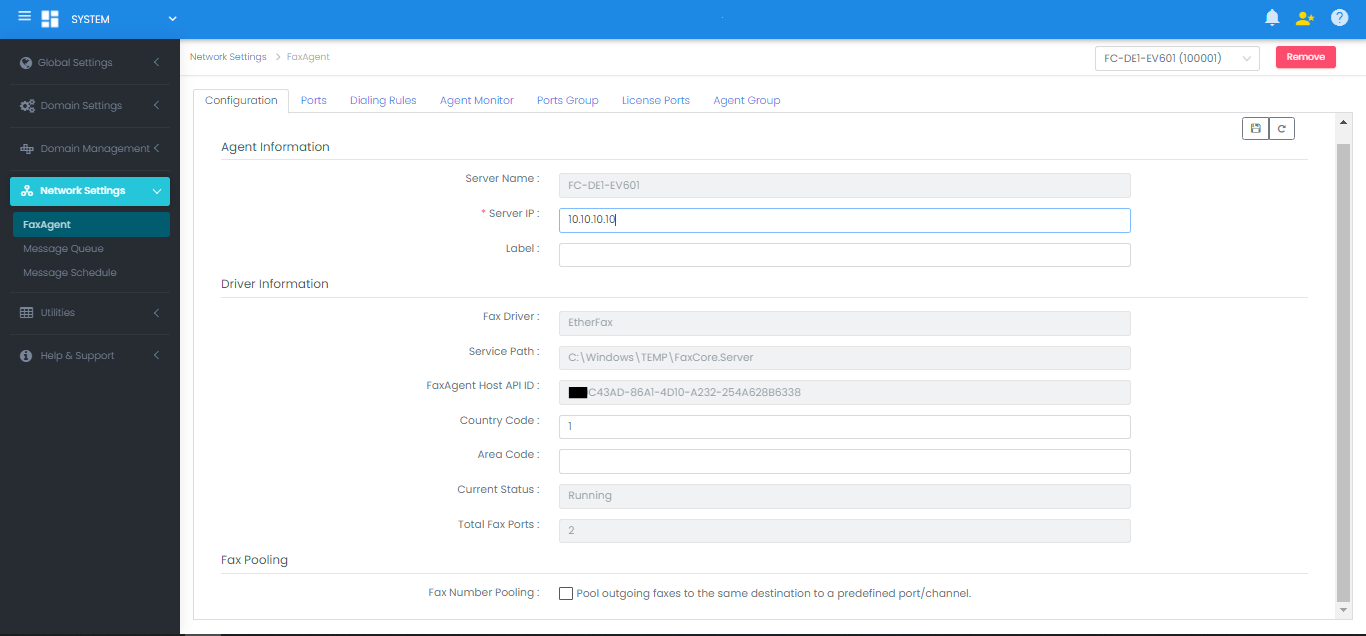
- Fax Agent Label: Descriptive identifier (e.g.,
Denver-Datacenter-Agent). - Country Code & Area Code: Telephony location where the FoIP lines terminate.
- Pool Outgoing Faxes to Same Destination: When enabled, queues outbound faxes directed to the same phone number through the same channel sequentially. This prevents multiple lines from calling the same number simultaneously, eliminating "Line Busy" conflicts.