Inbound Routing Rules
When an incoming fax transmission completes, the FaxCore routing engine inspects metadata attributes of the call to determine which user, group, printer, or folder receives the document.
Supported Inbound Routing Methods
FaxCore supports multiple concurrent routing criteria:
- Routing Digits (DID / DNIS): Direct Inward Dialing digits provided by the telephony carrier or PBX.
- Fax Port Number: Specific physical or virtual channel that answered the call.
- Remote CSID: The transmitting machine's Called Subscriber Identification string.
- Remote Caller ID (ANI): Calling party telephone number.
- Server Name: The specific FaxCore or FaxAgent host server receiving the transmission.
- Barcode Data: (Optional Module) 1D/2D barcodes decoded directly from the received document image.
Creating an Inbound Routing Rule
Navigate to Global Settings > Inbound Routing.
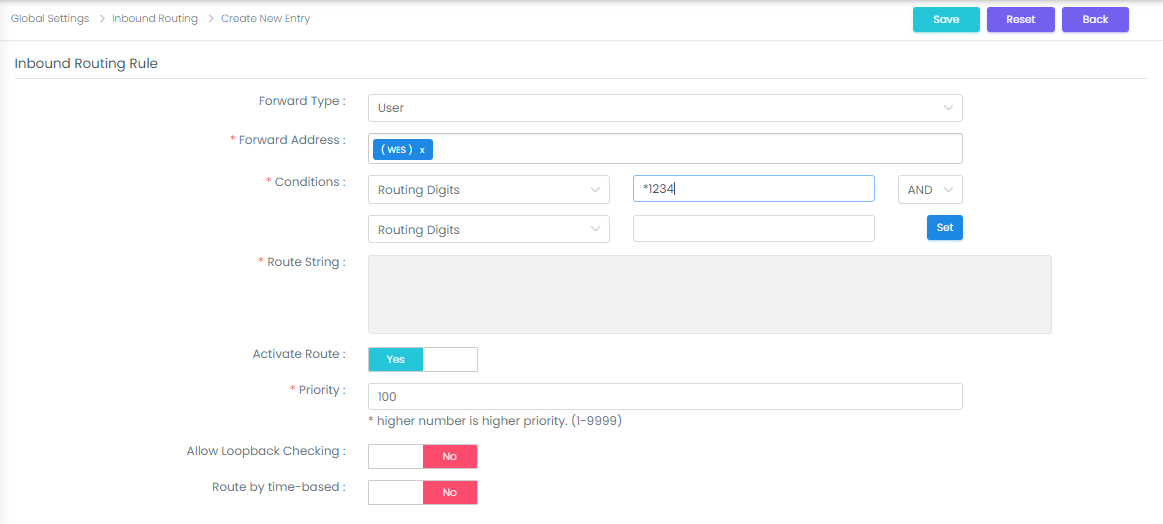
- Click the + (New) button to display the Inbound Routing Rule dialog:
- Define destination and conditions:
- Forward Type: Select User (delivers to a single user) or Group (delivers to a distribution group).
- Forward Address: Click inside the box to select the target user or group recipient.
- Conditions: Select the routing property (e.g.,
Routing Digits), operator (=), and matching value (e.g.,*1234). - Priority: Priority integer (default
100). Higher numerical values execute first. - Activate Route: Set to Yes.
- Click Save to commit the rule.
Editing or Deleting Inbound Rules
- Edit: Click the Pencil icon on the rule line to modify destination or conditions.
- Delete: Click the X icon to delete obsolete rules.