Record Purging & Storage Maintenance
As fax volume accumulates over time, database index size and document storage expand. FaxCore provides an automated purge engine to prune aging records and manage disk consumption.
1. Configuring Purge Policies
Navigate to Utilities > Purge Settings.
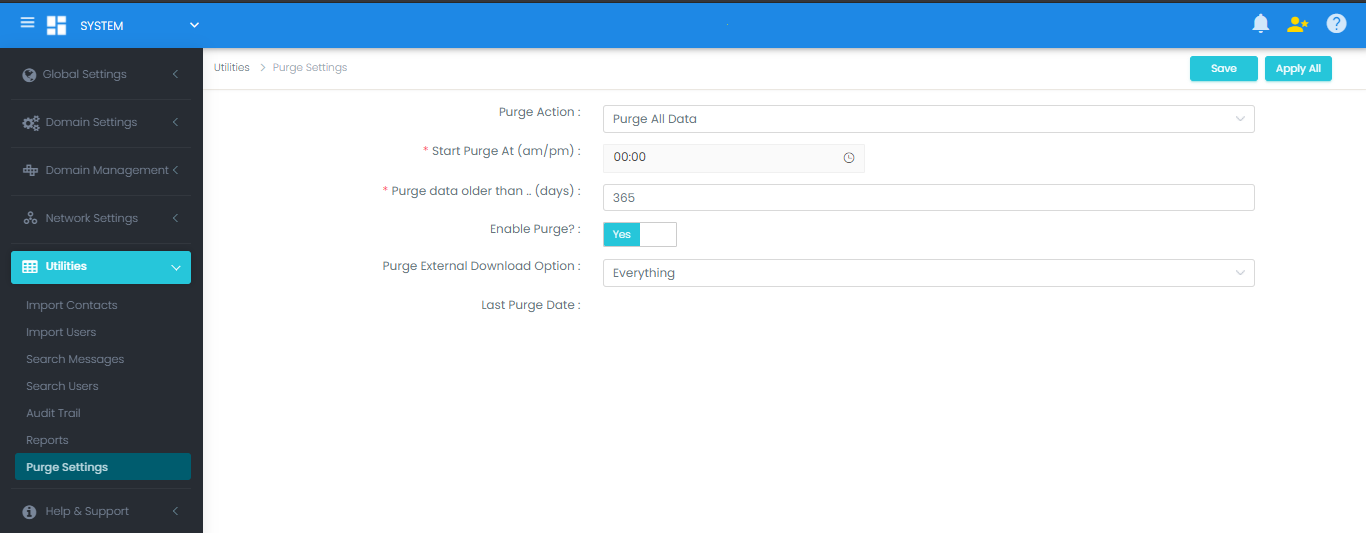
- Select the target domain (or choose SYSTEM to apply server-wide).
- Configure parameters:
- Purge Action:
- Purge All Data: Deletes both database transactional records and associated document TIFF/PDF files from the storage volume.
- Trim Messages: Deletes database transactional history while preserving document image files on disk.
- Start Purge At (am/pm): Time of day to run the maintenance job (recommended during off-peak hours, e.g.,
01:00 AM). - Purge Data Older Than (days): Retention window threshold (e.g.,
365days). - Enable: Set to Yes.
- Purge Action:
- Click Save and Apply All.
2. Enabling Purge Execution in Dispatcher Agent
Important
Safety Safeguard
Enabling the Purge Settings in the Web UI prepares the policy, but the FaxCore Dispatcher service includes a safeguard flag (PurgeDebug) to prevent accidental data deletion during initial setup.
To activate actual file deletion:
- Open the Dispatcher configuration file:
C:\FaxCore\svc.dispatcher\DispatchAgent.exe.config - Locate the key:
<add key="PurgeDebug" value="true" /> - Change the value to
"false":<add key="PurgeDebug" value="false" /> - Save the file.
- In Windows Services (
services.msc), restart the FXC6.Dispatcher service.
The purge worker evaluates maintenance criteria every 30 minutes and triggers during the scheduled retention window.