Queue Management & Scheduling
Administrators can monitor live outbound and inbound jobs across all delivery channels (Fax, Email, HTTP, FTP, File, Printer) and perform administrative interventions directly from the Admin Panel.
1. Message Queue (Real-Time Jobs)
Navigate to Network Settings > Message Queue.
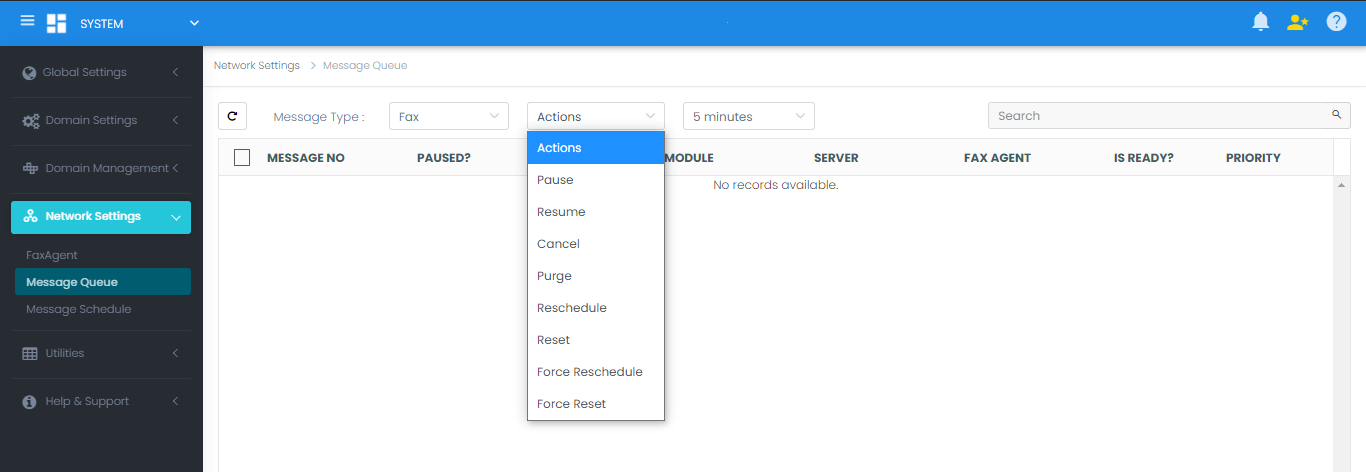
Filter by Message Type (Fax, Email, HTTP, FTP, File, Printer) to inspect active transmissions, assigned channels, retry attempts, and current states.
2. Message Schedule (Delayed Jobs)
Navigate to Network Settings > Message Schedule.
Displays faxes configured for delayed transmission (e.g., scheduled for midnight off-peak rates).
Administrative Queue Actions
Administrators can highlight one or more jobs in either queue and execute intervention commands from the Actions dropdown:
| Action | Functionality |
|---|---|
| Pause | Temporarily halts transmission of the selected job. |
| Resume | Resumes a previously paused job. |
| Cancel | Terminates the job and marks the transaction as cancelled. |
| Purge | Permanently deletes the message record and image files from the queue. |
| Reschedule | Changes the target execution date and time. |
| Reset | Re-evaluates outbound routing and dialing rules from scratch, re-assigning ports and dial strings. |
| Force Reschedule | Overrides an in-progress or locked state to re-queue the message for a future time. |
| Force Reset | Forcefully clears transmission locks and re-initializes routing calculations for stuck jobs. |