Domain SMTP Relay Engine & Cloud Providers
FaxCore eV6 revolutionizes outbound email notification delivery. While previous versions only supported basic, unauthenticated or legacy SMTP relay servers, FaxCore eV6 introduces a Multi-Provider Cloud Email Relay Engine. Administrators can now integrate enterprise identity backends, hyperscale cloud email services (AWS SES, Mailgun, SendGrid), and OAuth 2.0-authenticated Microsoft 365 services with granular per-domain inheritance.
Evolution: Legacy Relay vs. Modern Multi-Provider Engine
| Capability | Legacy FaxCore Relay | FaxCore eV6 Multi-Provider Relay |
|---|---|---|
| Authentication Protocols | Basic Auth (Username / Password) only | OAuth 2.0 Client Credentials, API Keys, AWS IAM, Basic Auth |
| Microsoft 365 Support | Legacy Basic Auth (Disabled by Microsoft) | Direct Modern Auth / Microsoft Graph API (Tenant ID + Client Secret) |
| Hyperscale Cloud Connectors | Not supported (required third-party proxies) | Native connectors for Amazon SES, Mailgun, and SendGrid |
| ISP Port 25 Blocking | Frequently blocked on public/cloud IPs | Bypassed via HTTPS REST APIs (SES, Mailgun, SendGrid) & TLS 587/465 |
| Testing & Diagnostics | Blind saves requiring full fax test cycles | Built-in Interactive Test Send Utility on every provider screen |
| Multi-Tenant Domain Scoping | Global server-wide only | Per-Domain Configuration with Apply All & Keep Local inheritance |
SMTP Relay Provider Hub
To access the relay configuration hub:
- Log in to the FaxCore Web Administration portal.
- In the left navigation menu, expand Domain Settings.
- Select SMTP Relay Settings (URL route:
/admin/domain/smtprelayauthsetting/).
The provider hub presents five dedicated service tiles:
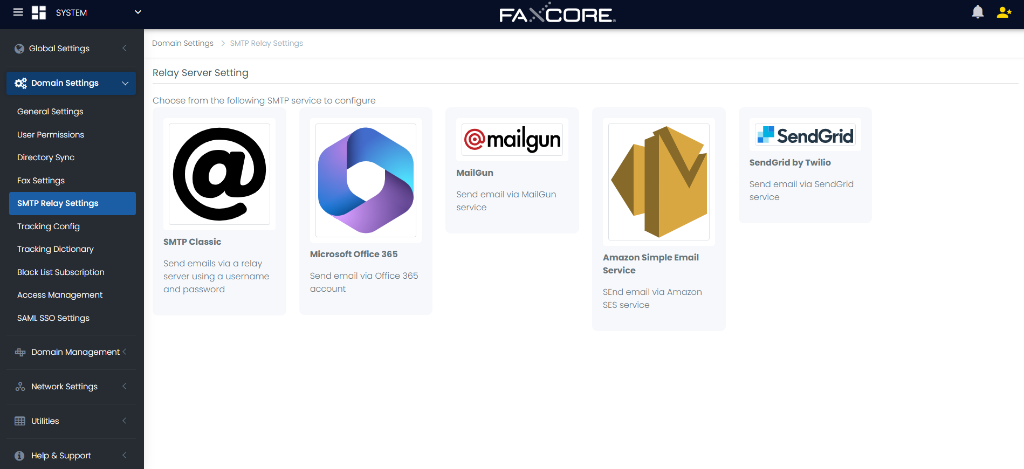
flowchart TD
    Hub["Domain Settings > SMTP Relay Settings"]
    Hub --> P1["SMTP Classic\n(Port 25/587/465, TLS/SSL)"]
    Hub --> P2["Microsoft Office 365\n(Tenant ID, Client ID, Secret)"]
    Hub --> P3["Mailgun\n(API Key, Verified Domain, URL)"]
    Hub --> P4["Amazon SES\n(39 Global/GovCloud Regions, IAM)"]
    Hub --> P5["SendGrid by Twilio\n(API Key, Verified Sender)"]

    P1 --> Test["Interactive Test Send Utility"]
    P2 --> Test
    P3 --> Test
    P4 --> Test
    P5 --> Test

    Test --> Deliver["Email Notifications, Receipts & Alerts"]
1. SMTP Classic (SettingType=SMTPC)
SMTP Classic maintains full compatibility with on-premise Exchange servers, Postfix, Sendmail, IIS SMTP virtual servers, and standard corporate mail relays.
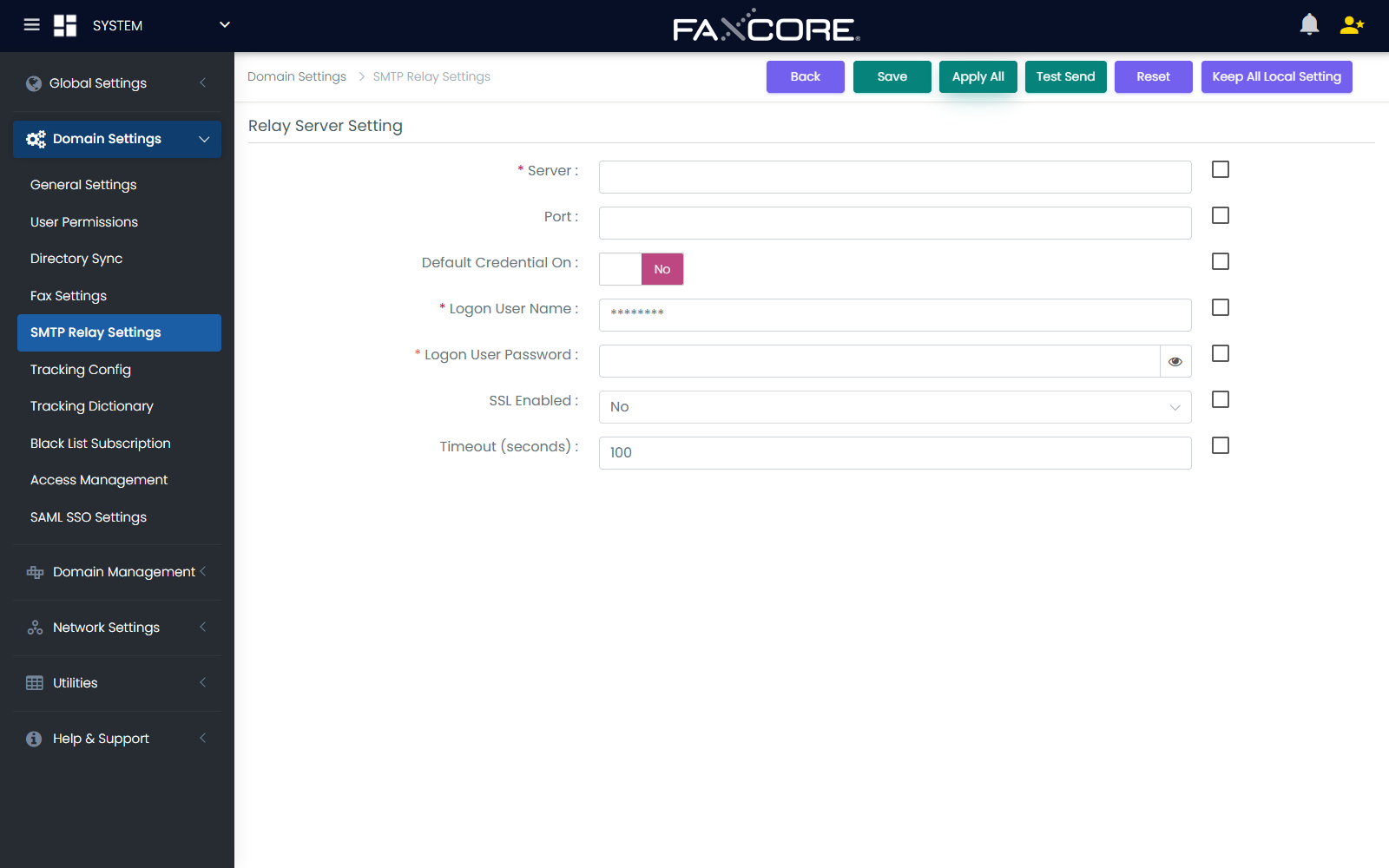
Configuration Parameters
| Field Name | Type | Description / Guidance |
|---|---|---|
| Server | Text | Hostname or IP address of the SMTP relay server (e.g., smtp.company.local or 192.168.1.50). |
| Port | Number | Target SMTP listening port: 25 (Standard), 587 (Submission / STARTTLS), or 465 (SMTPS SSL). |
| Default Credential On | Checkbox | Enable to authenticate using the FaxCore Windows service account (NTLM/Kerberos). |
| Logon User Name | Text | Username for authenticated SMTP relay (leave blank if anonymous relay is allowed). |
| Logon User Password | Password | Password for the SMTP relay account. |
| SSL Enabled | Dropdown | Security negotiation mode: • No [0]: Plaintext SMTP. • Yes [1]: Explicit SSL / TLS wrapper. • Yes on TLS [2]: Opportunistic STARTTLS upgrade. |
| Timeout (seconds) | Number | Maximum connection timeout in seconds before transmission fails (Default: 60). |
| Inheritance Checkboxes | Checkboxes | The small checkbox next to each field (_IsSet) defines whether this field overrides inherited parent domain settings. |
2. Microsoft Office 365 (SettingType=O365)
Microsoft has deprecated Basic Authentication across Exchange Online. FaxCore eV6 connects directly to Microsoft Entra ID (Azure AD) using an enterprise App Registration with OAuth 2.0 Client Credentials flow.
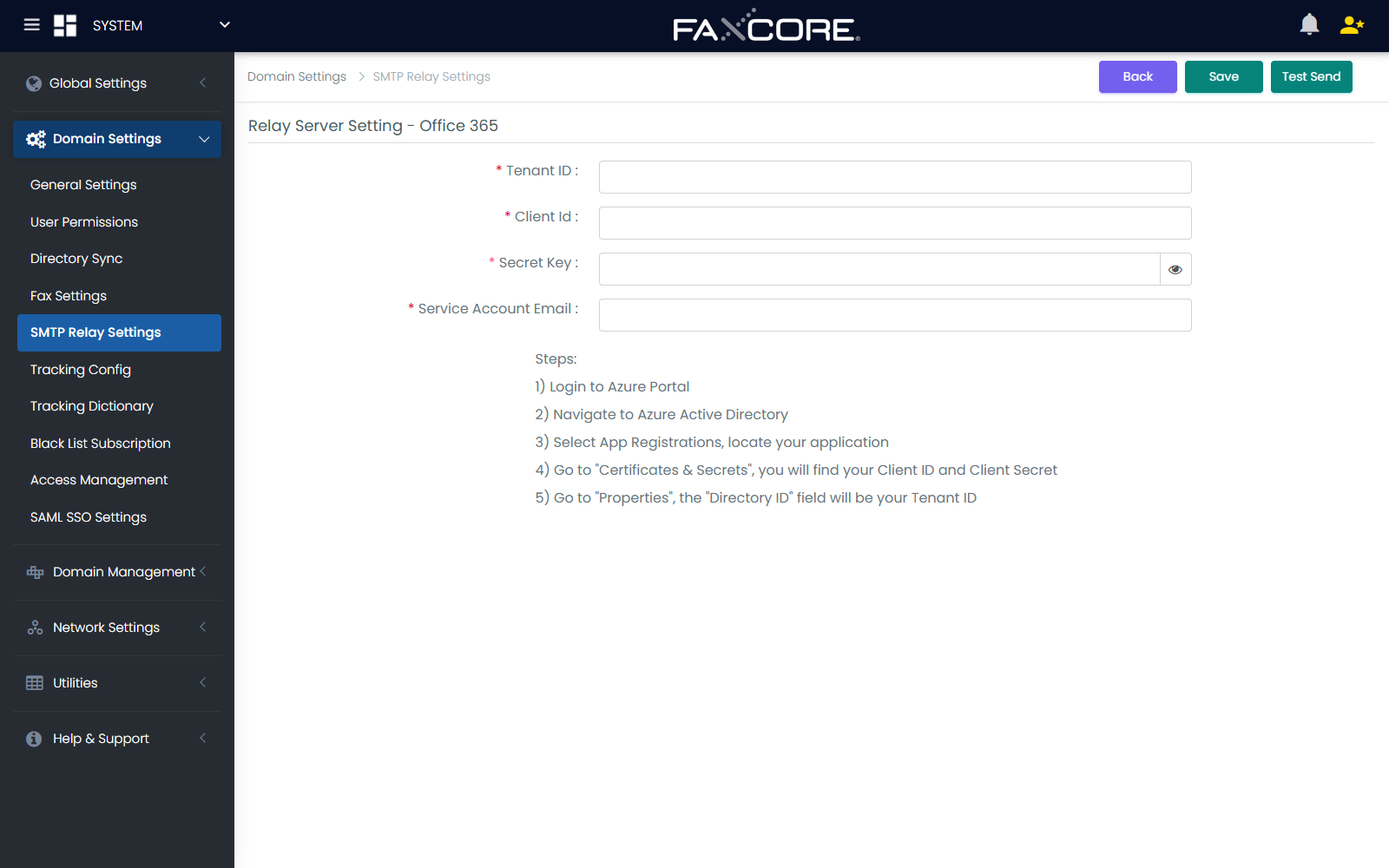
Configuration Parameters
| Field Name | Type | Description / Requirements |
|---|---|---|
| Tenant ID | Text (GUID) | The Azure Directory (Tenant) ID found in the Entra ID Overview blade. |
| Client Id | Text (GUID) | The Application (Client) ID of the registered FaxCore app in Azure. |
| Secret Key | Password | The active Client Secret Value generated under Certificates & secrets. |
| Service Account Email | The dedicated Exchange Online mailbox address authorized to send system emails (e.g., faxnotifications@yourdomain.com). |
Microsoft Entra ID (Azure AD) Setup Steps
- In the Microsoft Entra Admin Center, navigate to App registrations > New registration.
- Name the application (e.g.,
FaxCore Notification Relay) and select Single tenant. - Under API permissions, click Add a permission > Microsoft Graph > Application permissions.
- Grant the
Mail.Sendpermission. - Click Grant admin consent for [Your Organization].
- Under Certificates & secrets, click New client secret, set the expiration policy, and copy the Value.
- In FaxCore, enter the Tenant ID, Client Id, Secret Key, and Service Account Email, then click Save.
3. Mailgun (SettingType=MG)
Mailgun provides reliable cloud transactional email delivery with granular domain reputation tracking and dedicated IP support.
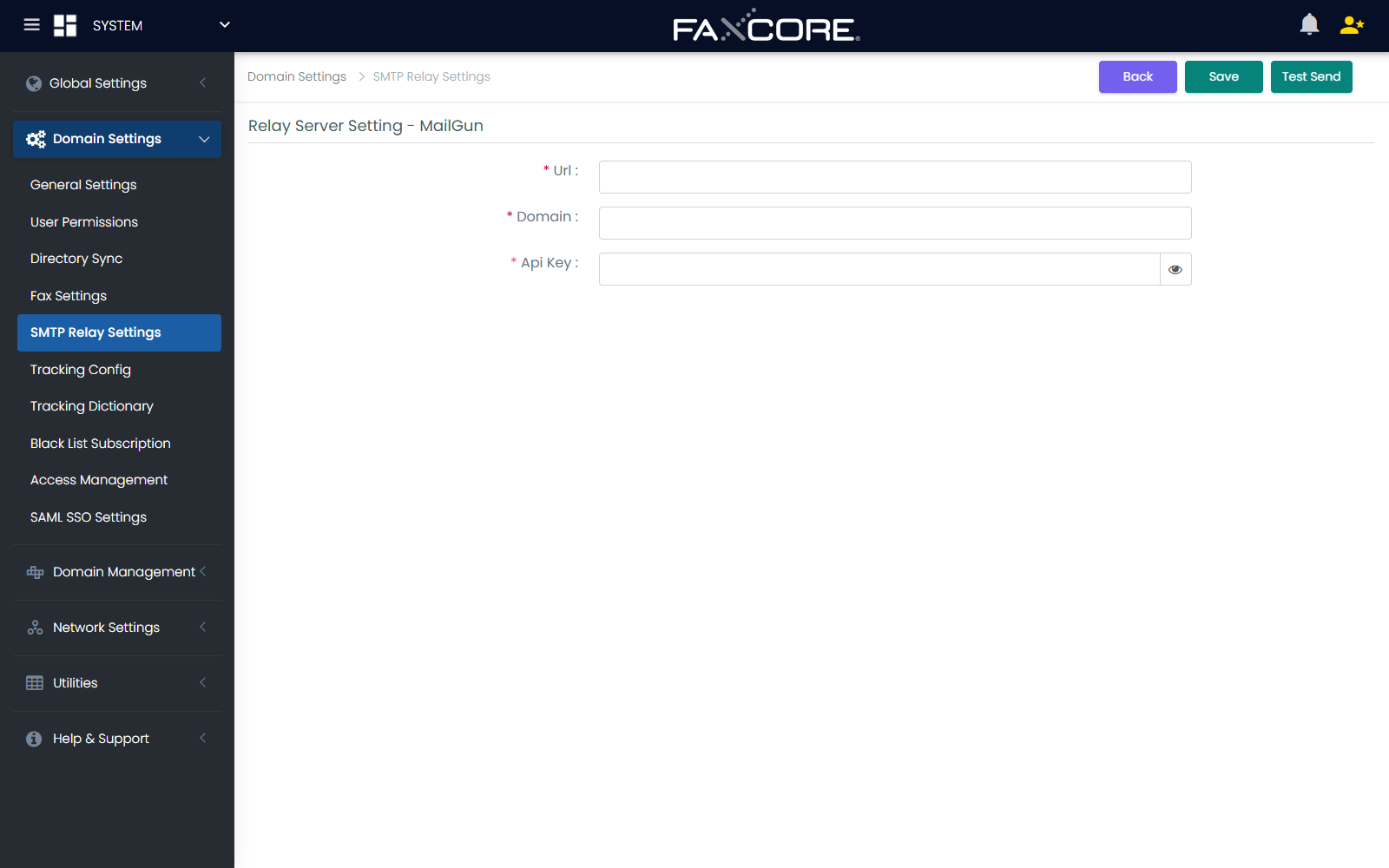
Configuration Parameters
| Field Name | Type | Description / Guidance |
|---|---|---|
| Url | URL | API endpoint URL: • US Region: https://api.mailgun.net/v3• EU Region: https://api.eu.mailgun.net/v3 |
| Domain | Text | The verified sending domain configured in Mailgun (e.g., mg.faxcorecloud.com or notify.yourdomain.com). |
| Api Key | Password | The primary Mailgun Sending API Key or Account API Key. |
| Sender Email | The default From email address (must match or be a subdomain of the verified sending domain). |
4. Amazon Simple Email Service - SES (SettingType=ASES)
Amazon SES is a hyperscale, cost-efficient cloud transactional email service. FaxCore eV6 includes native AWS SDK integration across 39 global AWS regions, including AWS GovCloud and isolated government partitions.
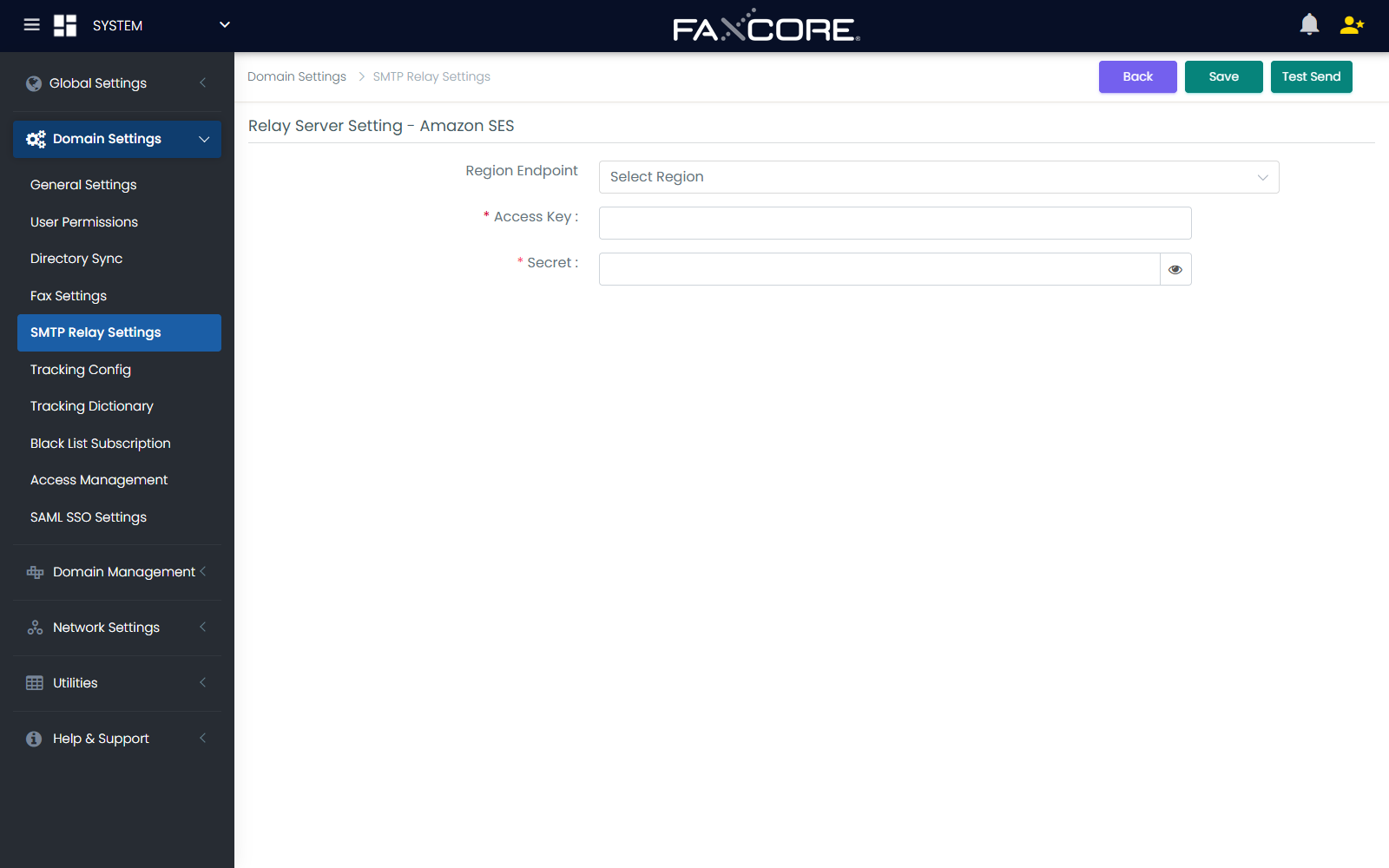
Configuration Parameters
| Field Name | Type | Description / Guidance |
|---|---|---|
| Region Endpoint | Dropdown | Select the exact AWS region where your SES identities and DKIM records are verified. |
| Access Key | Text | The AWS IAM Access Key ID (e.g., AKIAIOSFODNN7EXAMPLE). |
| Secret | Password | The AWS IAM Secret Access Key. |
| Sender Email | A verified email address or an address on a verified domain in AWS SES. |
Supported AWS Regions
FaxCore supports all commercial, GovCloud, and ISO regions:
- Americas:
us-east-1(N. Virginia),us-east-2(Ohio),us-west-1(N. California),us-west-2(Oregon),ca-central-1(Canada Central),ca-west-1(Calgary),sa-east-1(São Paulo). - Europe / Middle East / Africa:
eu-west-1(Ireland),eu-west-2(London),eu-west-3(Paris),eu-central-1(Frankfurt),eu-central-2(Zurich),eu-north-1(Stockholm),eu-south-1(Milan),eu-south-2(Spain),me-central-1(UAE),me-south-1(Bahrain),af-south-1(Cape Town),il-central-1(Tel Aviv). - Asia Pacific:
ap-southeast-1(Singapore),ap-southeast-2(Sydney),ap-southeast-3(Jakarta),ap-southeast-4(Melbourne),ap-southeast-5(Malaysia),ap-northeast-1(Tokyo),ap-northeast-2(Seoul),ap-northeast-3(Osaka),ap-south-1(Mumbai),ap-south-2(Hyderabad),ap-east-1(Hong Kong). - Government & Sovereign:
us-gov-east-1,us-gov-west-1(AWS GovCloud),cn-north-1(Beijing),cn-northwest-1(Ningxia),us-iso-east-1,us-iso-west-1,us-isob-east-1,eu-isoe-west-1.
Minimum AWS IAM Policy
Attach the following least-privilege IAM policy to the FaxCore IAM user:
{
  "Version": "2012-10-17",
  "Statement": [
    {
      "Effect": "Allow",
      "Action": [
        "ses:SendEmail",
        "ses:SendRawEmail"
      ],
      "Resource": "*"
    }
  ]
}
Important
When provisioning new AWS SES accounts, Amazon places accounts in the SES Sandbox. In sandbox mode, you can only send to verified recipient email addresses. You must request a production quota increase in the AWS Console to send faxes and notifications to external arbitrary addresses.
5. SendGrid by Twilio (SettingType=sg)
SendGrid provides high-throughput email delivery with real-time deliverability analytics and sender reputation management.
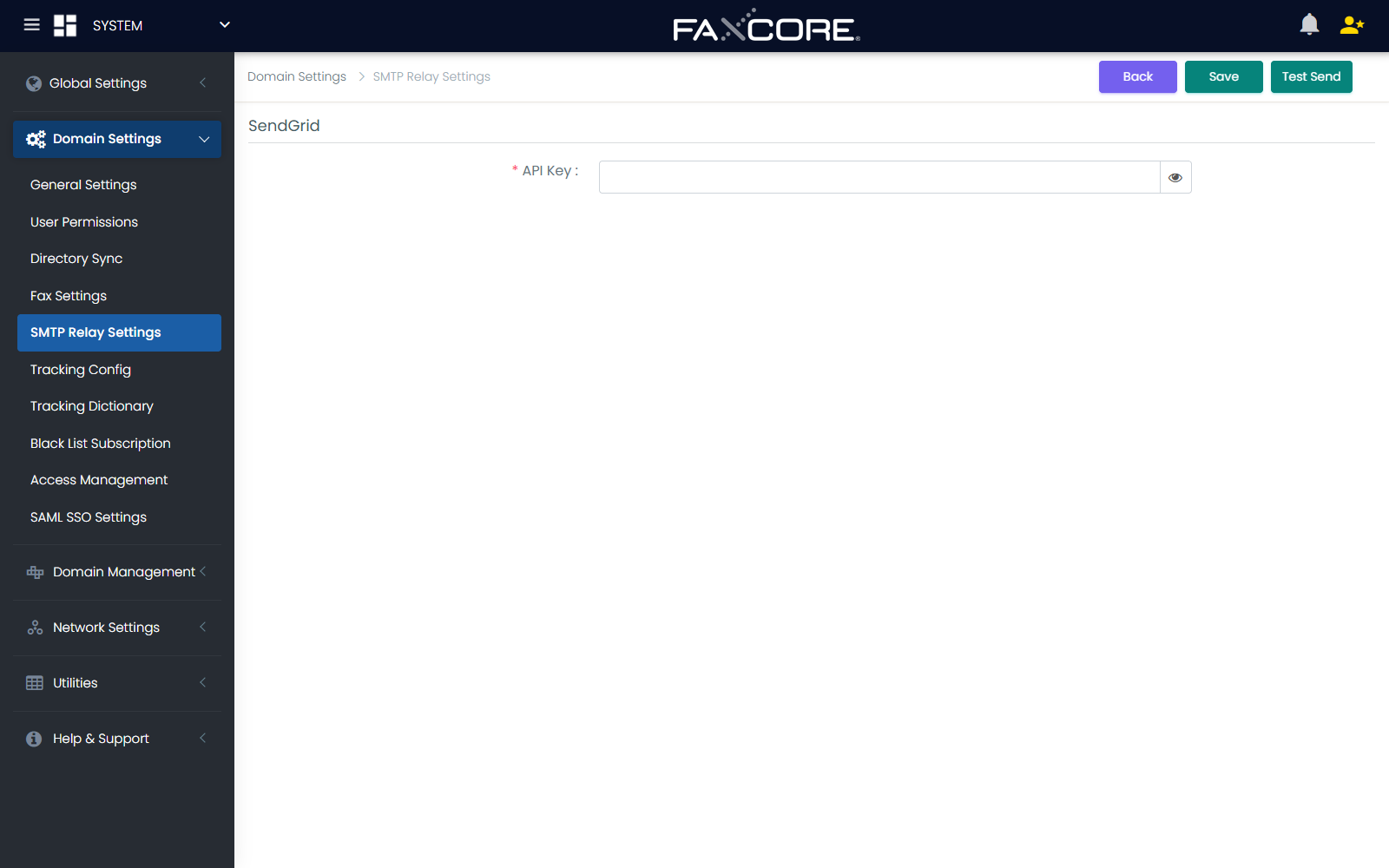
Configuration Parameters
| Field Name | Type | Description / Guidance |
|---|---|---|
| API Key | Password | SendGrid API Key starting with SG. with Mail Send permissions. |
| Sender Email | The verified Single Sender or domain-authenticated email address. |
Interactive Test Send Utility
Every provider configuration page includes an integrated Test Send modal, allowing administrators to validate credentials, firewalls, and deliverability immediately without creating test faxes.
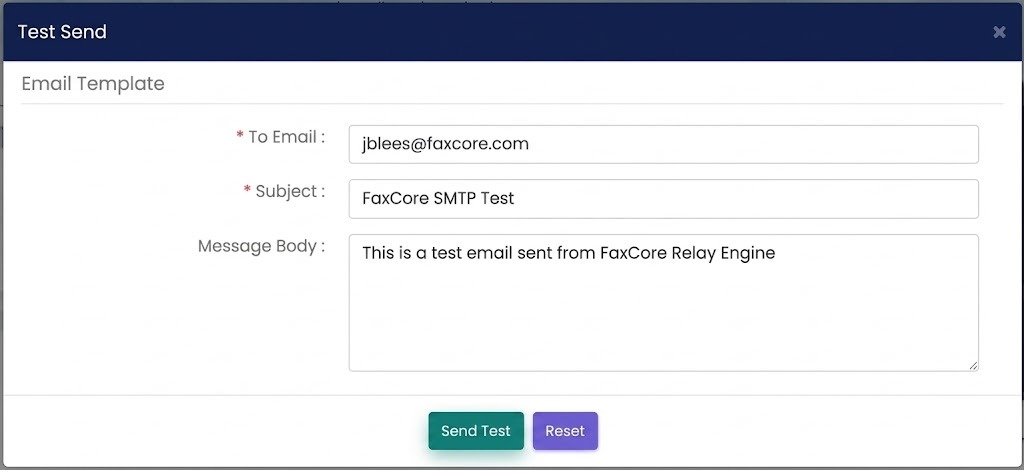
Test Parameters
- To Email: Destination recipient address for the test diagnostic email (e.g.,
jblees@faxcore.comor your admin mailbox). - Subject: Test email subject line (Default:
FaxCore SMTP Test). - Message Body: Test payload content (Default:
This is a test email sent from FaxCore Relay Engine).
Click Send Test to trigger immediate transmission. If the transmission succeeds, a confirmation banner appears. If it fails, the exact socket or HTTP API error response is displayed on screen for rapid troubleshooting.
Multi-Tenant Domain Scoping & Actions
FaxCore supports multi-tier domain hierarchies. System administrators can establish a global relay provider at the SYSTEM root, while individual client or branch domains can maintain independent providers.
Control Actions
- Save: Commits the configuration for the active domain.
- Apply All: Saves the current settings and forces them down to all subdomains, overwriting child domain configurations.
- Keep All Local Setting: Applies global configuration defaults across the system while preserving existing custom configurations on child domains.
- Reset: Reverts unsaved changes in the active form.
- Delete: Removes custom relay settings for the current domain, causing it to inherit the parent domain's relay configuration.
Troubleshooting & Diagnostics
| Symptom | Probable Cause | Recommended Resolution |
|---|---|---|
| Microsoft 365: 401 Unauthorized / Access Denied | Invalid Client Secret or missing Graph API permissions. | Verify the secret in Entra ID has not expired; confirm Mail.Send application permission is granted with Admin Consent. |
| Amazon SES: MessageRejected (Email address not verified) | SES account is in Sandbox mode, or sender address is unverified. | Verify the sender identity in the AWS SES console or submit an AWS support case to move SES out of Sandbox mode. |
| Mailgun: 401 Forbidden | Invalid API key or domain mismatch. | Verify whether the sending domain is registered in the US or EU endpoint region; check that the API key has Sending rights on that domain. |
| SMTP Classic: Connection Timed Out (Port 25) | Cloud host / ISP blocking outbound TCP port 25. | Switch to Port 587 (TLS) or Port 465 (SSL), or switch to a cloud API provider (SES, SendGrid, Mailgun) which transmits over HTTPS port 443. |
| TLS Handshake Failure | Incompatible SSL/TLS cipher suite or cert mismatch. | Adjust the SSL Enabled dropdown between Yes [1] and Yes on TLS [2]. Ensure the mail server presents a valid CA-signed TLS certificate. |